
To correct/change an employee’s email address that has already been sent the original employee self-service login email, follow the below steps:
-
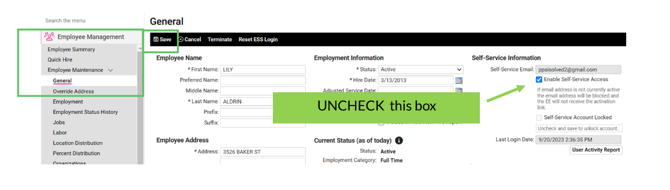
Navigate to EMPLOYEE MANAGEMENT > EMPLOYEE MAINTENANCE > GENERAL and select the employee.
-
At the SELF-SERVICE INFORMATION section: UNCHECK the ENABLE SELF-SERVICE ACCESS box.
-
Click SAVE, in black action bar. This re-activates the field and the email box will turn white to edit.
-
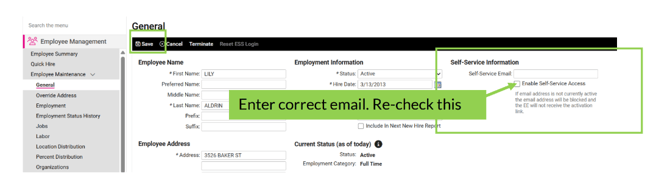
Remove existing email address and re-enter the correct email address.
-
RECHECK the ENABLE SELF-SERVICE ACCESS box.
-
Click SAVE, in black action bar. The new login email will be automatically sent.