---
title: How to create an additional or manual check
description: How to create an additional or manual check
---
[Skip to content](https://kb.premiernow.com/support/how-to-create-an-additional-or-manual-check#main-content)
English
Show submenu for translations

- [Forms](https://www.premiernow.com/support/#forms)
- [Guides](https://www.premiernow.com/support/#guides)
- [Tutorial Videos](https://www.premiernow.com/tutorial-videos/)
- [FAQs](https://www.premiernow.com/support/#faq)
- [Helpful Links & Calculators](https://www.premiernow.com/support/#links)
- [Send a Secure Document](https://www.premiernow.com/wp-content/uploads/2025/02/Resource-Icons-RGB_puzzle-08-4.png)
- [Book a Training](https://outlook.office365.com/book/PremierPayrollServicesInc@premiernow.com/s/BrjtVeJRnkKkRC4Uo074fA2)
Open main navigation
Close main navigation
- [Forms](https://www.premiernow.com/support/#forms)
- [Guides](https://www.premiernow.com/support/#guides)
- [Tutorial Videos](https://www.premiernow.com/tutorial-videos/)
- [FAQs](https://www.premiernow.com/support/#faq)
- [Helpful Links & Calculators](https://www.premiernow.com/support/#links)
- [Send a Secure Document](https://www.premiernow.com/wp-content/uploads/2025/02/Resource-Icons-RGB_puzzle-08-4.png)
- [Book a Training](https://outlook.office365.com/book/PremierPayrollServicesInc@premiernow.com/s/BrjtVeJRnkKkRC4Uo074fA2)
- English
Show submenu for translations
- [Contact Support](mailto:support@premiernow.com)
[Contact Support](mailto:support@premiernow.com)
How can we help you?
- There are no suggestions because the search field is empty.
1. [Support Hub](https://kb.premiernow.com/support?hsLang=en)
2. [Payroll FAQs](https://kb.premiernow.com/support/payroll-faqs?hsLang=en)
# How to create an additional or manual check
## Adding an Additional/Manual Check
Go to: PAYROLL PROCESSING\> PAYROLL ENTRY\> INDIVIDUAL TIME ENTRY.
- Select the employee for which you want to create an additional check.
- Click ADD NEW.
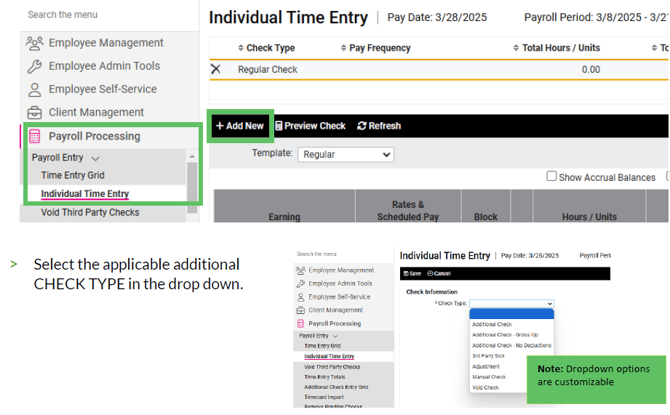
Common Types of Additional or Manual Checks:
1. **Additional Check:** (ex. Missed Paying an Employee COMPLETELY) Processing as a regular check and follows normal check pay and deduction rules. However, salary will not automatically be paid. You may also use an ADDITIONAL CHECK so that an employee receives two checks in a pay period to be more tax beneficial for the employee.
2. **Additional Check – No Deductions**: (ex. Shorted an Employee SOME HOURS) The check will include taxes, but will not include any of the employee’s regular deductions (401k/Co Match would need to be manually added or use ADDITIONAL CHECK and block any medical deductions).
3. **Manual Check** - You are writing a check on your end and need the taxes to be updated in the next payroll processed.
Note: If an Additional Check is added, the direct deposit with a Frequency of “Every Pay” will be used for the direct deposit transaction. A message is displayed alerting the user of this when an “Additional” check type is used.
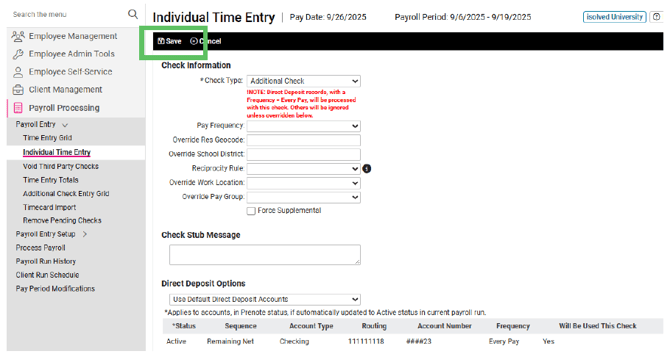
- Pay Frequency: Can override frequency of taxation (default is normal pay frequency: weekly, biweekly, etc.)
- Check Stub Message: Use this area to add a message for this check stub
- Click SAVE.
The next screen will show your new check type at the top of the screen:
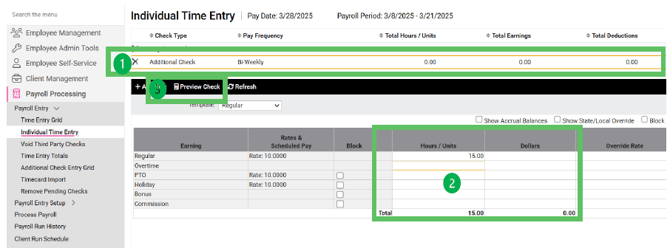
1. Select the Check Type “ADDITIONAL CHECK” (The one you created. Once selected, it will highlight with gold bar)
2. Enter the Hours or Dollars to be paid
3. Click PREVIEW CHECK to review the additional check you are looking to pay
Note: At the top left, you can switch TEMPLATE from REGULAR, to ALL to see all EARNING code, etc. on the check if the REGULAR TEMPLATE does not include the category you are looking to pay.
- [New Client FAQs](https://kb.premiernow.com/support/new-client-faqs?hsLang=en#main-content)
- [isolvedFAQs](https://kb.premiernow.com/support/new-client-faqs?hsLang=en#isolvedfaqs)
- [Dates & Deadlines](https://kb.premiernow.com/support/new-client-faqs?hsLang=en#dates-deadlines)
- [Employee Self-Service](https://kb.premiernow.com/support/employee-self-service?hsLang=en)
- [Payroll FAQs](https://kb.premiernow.com/support/payroll-faqs?hsLang=en)
Copyright © 2026, PremierNow Payroll & HR